Download
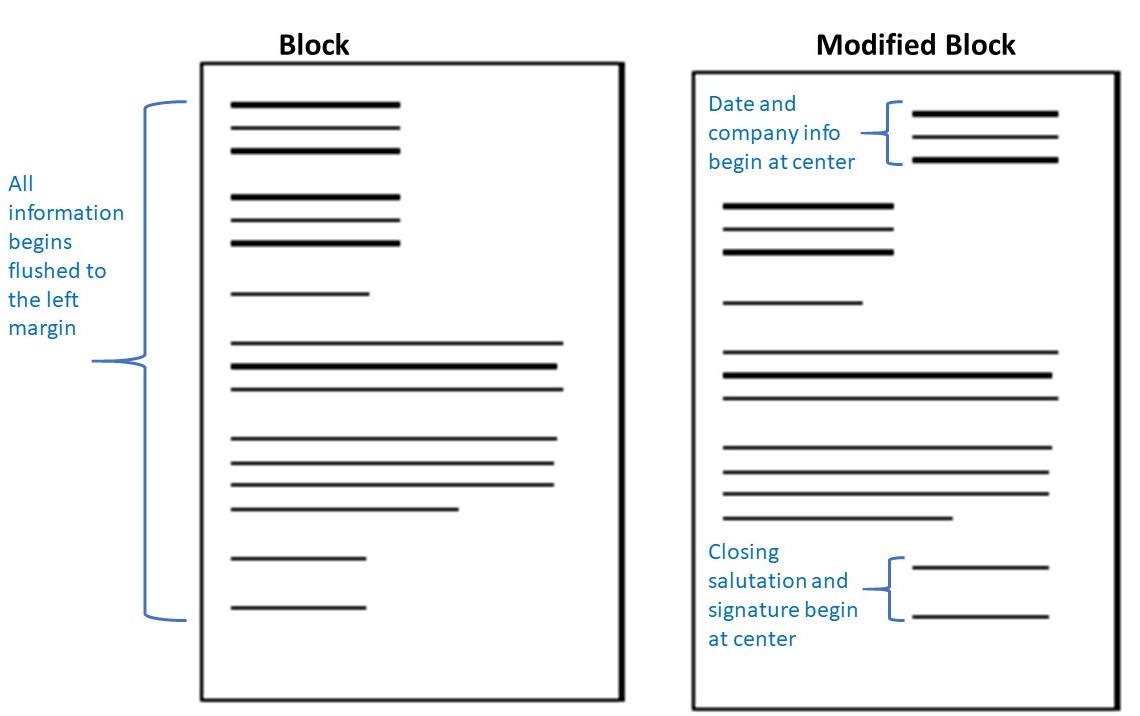
Block vs. modified block letter layout (Figure 21.1)
A textbook diagram that puts the two main business-letter layouts side by side: full block on the left, modified block on the right.
- Format
- Diagram (JPG)
- Opens in
- —
- Structure
- Two page outlines with text lines drawn as bars. Block: all information begins flush with the left margin. Modified block: the date and company info begin at the centre of the page, and so do the closing salutation and signature; the blocks in between start at the left margin.
Source and licence: CC BY 4.0
Communication at Work (2019), Unit 21: Letters, Figure 21.1, Jordan Smith, Kwantlen Polytechnic University (KPU Pressbooks).
Licence: CC BY 4.0
"Figure 21.1: The two main letter formats used in business communications" from Communication at Work by Jordan Smith (Kwantlen Polytechnic University), https://kpu.pressbooks.pub/communicationsatwork/chapter/7-1-letters/, licensed under CC BY 4.0 (https://creativecommons.org/licenses/by/4.0/).
What we changed: None. The image is reproduced as published.
Letter
Annotated block-format cover letter (Technical Writer)
Full block format, annotated
A full block cover letter from an experienced applicant, with the textbook's own notes on each part: heading, date, inside address, RE line, salutation with a colon, three body paragraphs, closing and enclosure line.
Read the full letter
Dear Jennifer Smith:
I read with interest your ad for a Technical Writer in Tech Comm Today and am submitting my resume for your review and consideration. With degrees in both computer science and English, I possess and even exceed the required skills to do the job. I have over a decade of technical writing experience. In my current job I have written and edited numerous technical documents, including white papers, tutorials, reports, and user manuals.
I have a thorough knowledge of the Northgate University Professional Technical Writing Guide and the Newswire Stylebook. With outstanding technical and writing skills, I am able to create documents that are thorough, clear, and user-friendly. Because of my superior communication and interviewing abilities, I was able to work with subject-matter experts to immerse myself in a new software product gather information and identify relevant data. The resulting user manuals were well received by employees that were new to the software. I have been involved in the introduction of new technology to users from the first communication to the user manual to developing training materials.
I'd love to bring my experience to your company for our mutual benefit. I look forward to your call at your earliest convenience. I am available to meet with you at any time. Thank you for your time and consideration.
Sincerely,
John Briggs
Enclosure: Resume
The source’s notes on each part
- Sender block
- include applicant's information at the top
- Date
- include date
- Inside address
- include addressee's information
- RE line
- include subject line to help the reader (optional)
- Salutation
- use a formal greeting with the person's full name (vs. Mr. or Ms.) followed by a colon
- Body layout
- note the block paragraph style and the use of white space
- Paragraph 1
- intro paragraph states the purpose, where the applicant learned of the position, and some information about the applicant relevant to the position
- Paragraph 2
- note the writer's use of a specific example here that supports his claim of having superior skills
- Paragraph 3
- here the applicant mentions how his experience and expertise will benefit the company and that he's available to meet, and then he thanks them for their consideration
- Closing
- include a standard closing
- Name
- include name
- Enclosure line
- list any documents that accompany the letter
Source and licence: CC BY 4.0
Cover Letter Sample (annotated), PDF linked from "4.5 Cover Letters", TPW: Technical & Professional Writing (2023), Will Fleming, Open Oregon Educational Resources.
Licence: CC BY 4.0
"Cover Letter Sample (annotated)" from TPW: Technical & Professional Writing by Will Fleming, Open Oregon Educational Resources, https://openoregon.pressbooks.pub/techwriting2e/chapter/4-5-cover-letters/, licensed under CC BY 4.0. Adapted.
What we changed: Phone number replaced with "(541) 555-0188" and the email address with "email@example.com". The two real style guides named in paragraph 2 replaced with fictional ones ("Northgate University Professional Technical Writing Guide", "Newswire Stylebook"). The bracketed notes printed inline in the PDF are moved out of the letter into the annotations list, with their wording unchanged.
Letter
Job inquiry letter (annotated)
Letter of inquiry / cold outreach
An unsolicited letter asking about supply chain management openings that may not be advertised. The source PDF says it can be used as a model for a printed letter or an email, and annotates each part.
Read the full letter
Dear Ms. Marsh:
I am interested in any supply chain management positions Northbend Alloys might have available now or in the near future. I have over 16 years' experience in the specialty metals industry, and I just completed a degree in Business Management at Kestrel Valley Community College with a specific focus on supply chain management.
I have considerable hands-on experience as a welder and shop foreman at Ridgeway Fabrication, and I am well versed in the CAD/CAM systems that Northbend Alloys uses.
My attached resume highlights my other qualifications. I would greatly appreciate a chance to discuss how I might be able to contribute to Northbend Alloys.
If you need further information about my credentials, I can be reached anytime at (541) 555-0141 or via email at jjohnson@example.com.
Thank you for your time and consideration.
The source’s notes on each part
- RE or Subject line
- this briefly states the letter's purpose, which is something readers appreciate.
- Salutation
- this is a formal greeting/salutation; you can also use the person's full name instead of Mr., Mrs., or Ms. "Dear Dana Marsh"
- Paragraph 1
- the purpose is clear and two important and relevant points are stated right away in a single sentence
- Paragraph 2
- using one or two specific things makes it more likely that the reader will remember them
- Paragraph 3, first sentence
- but don't assume they'll look at it, so if there's something important and relevant (like the experience and the degree in paragraph 1), it should go in
- Paragraph 3, second sentence
- state what you can do for them, not why you want the job
- Paragraph 4
- make it easy for them to contact you
- Paragraph 5
- be sure to thank them
- Closing
- include a closing
- Name
- include your name (and signature if printed)
Source and licence: CC BY 4.0
Job Inquiry Letter Sample, PDF linked from "4.4 Business Letter Types", TPW: Technical & Professional Writing (2023), Will Fleming, Open Oregon Educational Resources.
Licence: CC BY 4.0
"Job Inquiry Letter Sample" from TPW: Technical & Professional Writing by Will Fleming, Open Oregon Educational Resources, https://openoregon.pressbooks.pub/techwriting2e/chapter/4-4-business-letter-types/, licensed under CC BY 4.0. Adapted.
What we changed: Real organisations replaced with fictional ones: the recipient company (named in the header and paragraphs 1–3) with "Northbend Alloys", the former employer with "Ridgeway Fabrication", the community college with "Kestrel Valley Community College". The recipient's name replaced with "Dana Marsh" (also in the salutation and in the salutation note), and the recipient's P.O. box number with "P.O. Box 100". The phone number replaced with "(541) 555-0141" in the header and paragraph 4. The PDF gives two different email addresses (header and paragraph 4); both replaced with "jjohnson@example.com". The PDF's title lines ("Job Inquiry Letter Sample", "can be used as a model for a printed letter or an email") are not reproduced as letter text; the second is reflected in the note. The highlighted notes printed inline in the PDF are moved into the annotations list, wording unchanged.
Letter
Email application: sending a resume and cover letter by email
Email application
A short email body that acts as a mini cover letter, with the resume and cover letter attached as separate files. The guide recommends putting your name, the job title and any reference number in the subject line, and file names without spaces.
Read the full letter
Dear [Hiring Manager's Name],
I hope this message finds you well. I am writing to express my interest in the [Job Title] position at [Company Name], as advertised on [Job Board or Company Website].
Attached are my resume and cover letter for your review. I believe my background in [brief mention of relevant experience or skills] aligns well with the requirements of this role.
I would welcome the opportunity to discuss how my skills and experience can contribute to your team.
Thank you for your time and consideration.
Sincerely,
[Your Full Name]
[Phone Number]
[Email Address]
[Professional Profile URL - optional]
Attachments:
1. [YourName_Resume.pdf]
2. [YourName_CoverLetter.pdf]
Source and licence: Public domain (U.S. government work)
Resume Essentials Participant Guide (February 2026), "How to Send a Resume in an Email" and "Email Template for Submitting a Resume and Cover Letter", pp. 67–68, U.S. Department of Labor, Veterans' Employment and Training Service (VETS).
Licence: Public domain (U.S. government work)
Source: U.S. Department of Labor, Veterans' Employment and Training Service, "Resume Essentials Participant Guide" (February 2026), pp. 67–68, https://www.dol.gov/agencies/vets/programs/tap. Public domain. Adapted; no endorsement implied.
What we changed: The optional profile-URL line in the signature names one specific social network in the source; we made it generic ("[Professional Profile URL - optional]"). The "Email Body:" label is omitted, and the subject line is shown as the header. The tips on p. 67 are summarised in the note, not reproduced.