MODERN RESUME TEMPLATES

Modern resume templates

Contemporary typography and spacing, still single-column and still parseable.

Download templates

Modern without the sidebar

The usual "modern" resume puts skills in a coloured left column. That column is exactly what breaks extraction. These templates get their character from type, weight, and whitespace instead.

Where they fit

Design-adjacent, startup, product, and marketing roles where a flat document reads as dated. Underneath the styling they keep one column and standard section names.

  • Single column, no sidebar
  • Restrained accent colour
  • LaTeX and RenderCV sources

Modern resume templates

Templates with colour accents, icons or distinctive type, all still single column. Every file is third-party work under an open licence. We cleaned personal data from the samples, and each download ships with its licence and a notice of changes.

Download

Awesome CV (resume)

LaTeX résumé with a coloured accent, a large two-weight name and FontAwesome contact icons. The sample was the author’s real CV, so we replaced all of it; the class file is unmodified.

Format
LaTeX (XeLaTeX)
Opens in
Overleaf or any TeX distribution (XeLaTeX)
Structure
Single column with right-aligned location and date. \makecvfooter prints date, name and "Résumé" in the footer; the header uses FontAwesome icons. The manifest’s pdftotext check of the original PDF found a clean reading order.
Source and licence: CC BY-SA 4.0 (template files); LPPL 1.3c (awesome-cv.cls)

Awesome-CV (posquit0/Awesome-CV), examples/resume.tex and resume/*.tex with awesome-cv.cls, commit 6701180c71479588dae5d895c4a10a6a572a40a0 (2026-09-14), Claud D. Park (posquit0).

Licence: CC BY-SA 4.0 (template files); LPPL 1.3c (awesome-cv.cls)

Based on Awesome CV by Claud D. Park (https://github.com/posquit0/Awesome-CV); template CC BY-SA 4.0, class LPPL 1.3c. Modified by ATS Safe GPT.

What we changed: resume.tex: real name, address, mobile, email, homepage, GitHub and LinkedIn replaced with fictional values (Taylor Morgan, 555-0175, example.com, your-username), footer name updated, "Modified by" comment added. All nine resume/*.tex section files rewritten with fictional employers, schools, awards, certificates and events; environments and commands unchanged. awesome-cv.cls not modified. Modified template files remain CC BY-SA 4.0. Original PDF not included.
Download

RenderCV "opal" theme

RenderCV theme with a teal accent and centred section titles. You edit the YAML and run rendercv render.

Format
YAML (RenderCV input, renders to PDF via Typst)
Opens in
Any text editor, then the RenderCV command line (installed separately)
Structure
Single column; Lato (not bundled), teal accent, centred section titles; footer off by default (show_footer: false). Per the manifest’s pdftotext check, header icons extract as private-use glyphs but the order is correct.
Source and licence: MIT

RenderCV, opal theme sample (John_Doe_OpalTheme_CV.yaml), commit 1d4b87bc427e4cf61c0ef49623c971b0e2224708 (2026-03-25), rendercv_typst 0.3.0, Sina Atalay and RenderCV contributors.

Licence: MIT

RenderCV opal theme, Copyright (c) 2023 to present Sina Atalay and individual contributors, MIT License (https://github.com/rendercv/rendercv)

What we changed: Sample CV YAML only: removed the "Welcome to RenderCV" section; replaced real universities, companies, investors, a named professor, awards, conferences, talk venues, project names and US patent numbers with fictional or generic ones; email and website moved to example.com, LinkedIn/GitHub usernames set to "your-username", location changed. Design, locale and settings parts unchanged. The generated .typ file and sample PDF are not included.

Download

RenderCV "ember" theme

RenderCV theme with a dark-red accent and no header icons. You edit the YAML and run rendercv render.

Format
YAML (RenderCV input, renders to PDF via Typst)
Opens in
Any text editor, then the RenderCV command line (installed separately)
Structure
Single column; Ubuntu font (not bundled), dark-red accent, no header icons. The footer is on by default (show_footer: true).
Source and licence: MIT

RenderCV, ember theme sample (John_Doe_EmberTheme_CV.yaml), commit 1d4b87bc427e4cf61c0ef49623c971b0e2224708 (2026-03-25), rendercv_typst 0.3.0, Sina Atalay and RenderCV contributors.

Licence: MIT

RenderCV ember theme, Copyright (c) 2023 to present Sina Atalay and individual contributors, MIT License (https://github.com/rendercv/rendercv)

What we changed: Sample CV YAML only: removed the "Welcome to RenderCV" section; replaced real universities, companies, investors, a named professor, awards, conferences, talk venues, project names and US patent numbers with fictional or generic ones; email and website moved to example.com, LinkedIn/GitHub usernames set to "your-username", location changed. Design, locale and settings parts unchanged. The generated .typ file and sample PDF are not included.

Download

RenderCV "ink" theme

RenderCV theme with an EB Garamond serif and a left-aligned purple name. You edit the YAML and run rendercv render.

Format
YAML (RenderCV input, renders to PDF via Typst)
Opens in
Any text editor, then the RenderCV command line (installed separately)
Structure
Single column; EB Garamond (not bundled), deep-purple name, left-aligned header, no icons. The footer is on by default (show_footer: true).
Source and licence: MIT

RenderCV, ink theme sample (John_Doe_InkTheme_CV.yaml), commit 1d4b87bc427e4cf61c0ef49623c971b0e2224708 (2026-03-25), rendercv_typst 0.3.0, Sina Atalay and RenderCV contributors.

Licence: MIT

RenderCV ink theme, Copyright (c) 2023 to present Sina Atalay and individual contributors, MIT License (https://github.com/rendercv/rendercv)

What we changed: Sample CV YAML only: removed the "Welcome to RenderCV" section; replaced real universities, companies, investors, a named professor, awards, conferences, talk venues, project names and US patent numbers with fictional or generic ones; email and website moved to example.com, LinkedIn/GitHub usernames set to "your-username", location changed. Design, locale and settings parts unchanged. The generated .typ file and sample PDF are not included.

Download

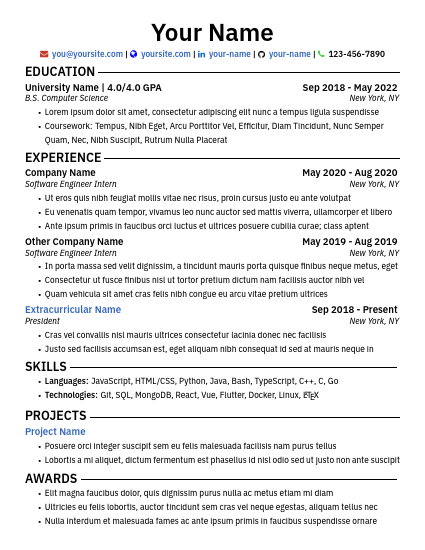
Single-column resume with coloured icons

One-page template with coloured contact icons and blue linked titles. It ships with placeholder text only, so we did not change it.

First page of the template: "Your Name" header with coloured contact icons, then Education, Experience, Skills, Projects and Awards sections with placeholder text.
Format
LaTeX (LuaLaTeX)
Opens in
Overleaf or any TeX distribution (LuaLaTeX)
Structure
Single column (README: "A single-column resume template"). Per the manifest’s pdftotext check, the contact-line icons extract as private-use glyphs; section order is clean. Icon font licence not checked.
Source and licence: MIT

resume-template (MdAbedin/resume-template), commit 173182b969b2cc9144d128ac479955f853e28b69 (2020-08-25), Md Abedin.

Licence: MIT

Based on resume-template, Copyright (c) 2020 Md Abedin, MIT License (https://github.com/MdAbedin/resume-template)

What we changed: None to the template files; a NOTICE.txt was added to the bundle. Preview rendered from the shipped PDF at 50 dpi.

See your match rate in under a minute

Upload a resume, paste a job posting, and find out what the applicant tracking system sees.

Get your free resume score